> ## Documentation Index
> Fetch the complete documentation index at: https://docs.withbind.com/llms.txt
> Use this file to discover all available pages before exploring further.
# Inbound
> Navigate the inbound flow of consigner Items awaiting acceptance into your inventory, with advanced search and filter options to streamline the process.
## About
The Inbound Inventory provides an overview of Items that have been created by Consigners and are awaiting Acceptance. Once a Consigner delivers their Item to the specified Location, Admin or Employees can accept it.
Inbound's main purpose is to accept Consigner Items into your store.
## Search
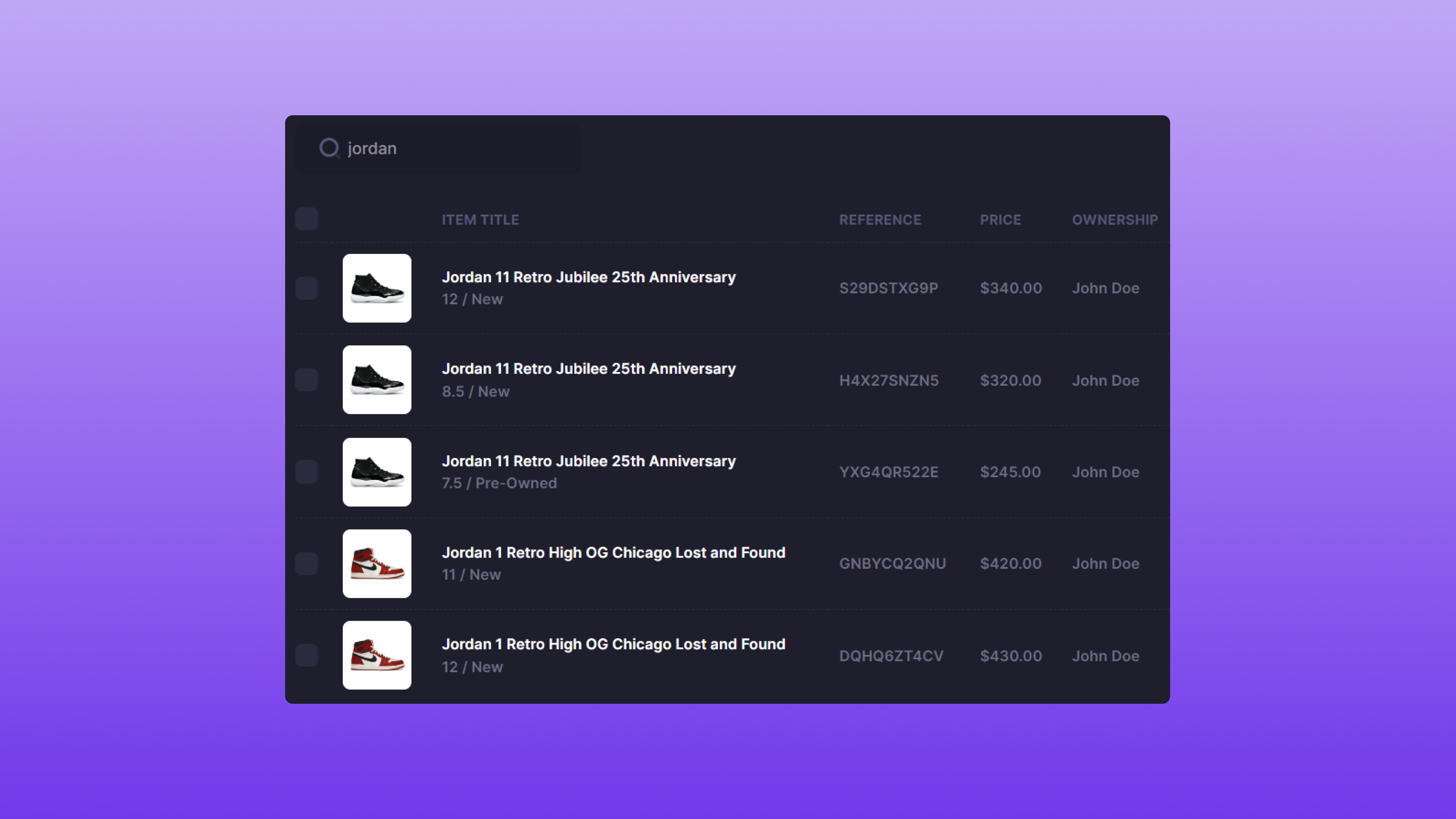 Inbound allows you to Search for products using either the title or SKU.
## Filter
Inbound allows you to Search for products using either the title or SKU.
## Filter
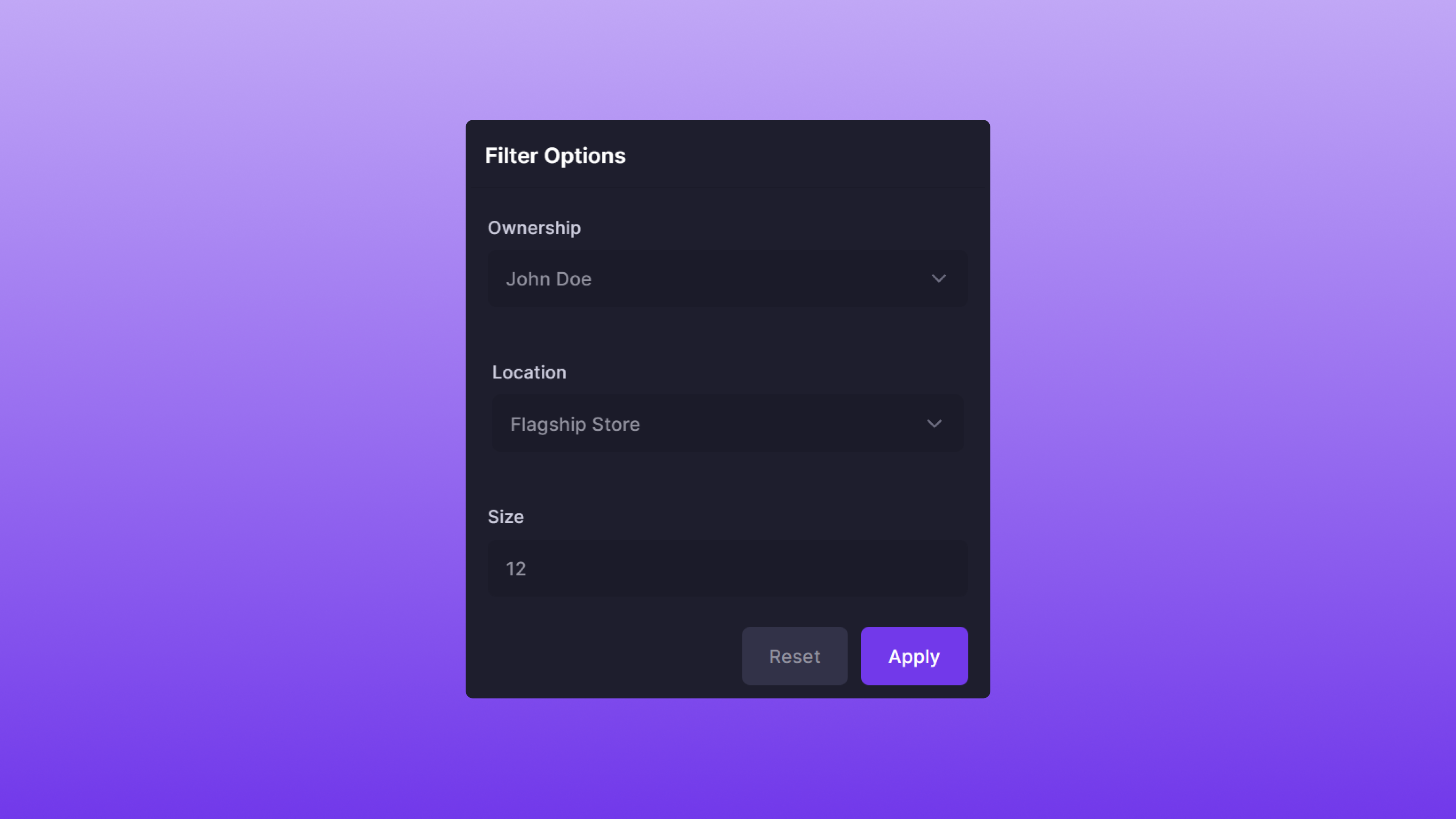 Inbound also supports the ability to Filter results to your specification. The Filter options are as follows:
* **Ownership**: The Item owner's full name.
* **Location**: The Item's location.
* **Size**: The Item's size.
The filtering attributes work in conjunction with each other. For example, the Filter image above would return Items that have:
* **John Doe** as the sole owner
* **Flagship Store** as the location
* **12** as the size
The attributes are optional; you can choose as many or as few as desired.
## Using Search & Filter
Search and Filter can also be used in conjunction with each other. A few examples of this feature are below:
| Item Title | Size | Ownership | Location |
| ----------------------------- | ---- | --------- | -------------- |
| adidas Yeezy Foam RNNR Sulfur | 12 | John Doe | Flagship Store |
| adidas Yeezy Slide Ochre | 10 | Jane Doe | Flagship Store |
| adidas Yeezy Foam RNNR Sulfur | 12 | Jane Doe | Flagship Store |
### Example #1
* **Search**: `adidas yeezy`
* **Filter**:
* **Location**: Flagship Store
Since all three Items are located at the **Flagship Store**, all are returned.
### Example #2
* **Search**: `adidas yeezy`
* **Filter**:
* **Size**: 12
* **Ownership**: John Doe
Since there's only one Item that is a size **12** and owned by **John Doe**, one is returned.
### Example #3
* **Search**: `sulfur`
* **Filter**:
* **Ownership**: John Doe
Since there's only one item owned by **John Doe**, one is returned.
### Benefits
Using both Search and Filter is the recommended method to quickly and accurately accept Items into consignment.
## Accepting an Item
Inbound also supports the ability to Filter results to your specification. The Filter options are as follows:
* **Ownership**: The Item owner's full name.
* **Location**: The Item's location.
* **Size**: The Item's size.
The filtering attributes work in conjunction with each other. For example, the Filter image above would return Items that have:
* **John Doe** as the sole owner
* **Flagship Store** as the location
* **12** as the size
The attributes are optional; you can choose as many or as few as desired.
## Using Search & Filter
Search and Filter can also be used in conjunction with each other. A few examples of this feature are below:
| Item Title | Size | Ownership | Location |
| ----------------------------- | ---- | --------- | -------------- |
| adidas Yeezy Foam RNNR Sulfur | 12 | John Doe | Flagship Store |
| adidas Yeezy Slide Ochre | 10 | Jane Doe | Flagship Store |
| adidas Yeezy Foam RNNR Sulfur | 12 | Jane Doe | Flagship Store |
### Example #1
* **Search**: `adidas yeezy`
* **Filter**:
* **Location**: Flagship Store
Since all three Items are located at the **Flagship Store**, all are returned.
### Example #2
* **Search**: `adidas yeezy`
* **Filter**:
* **Size**: 12
* **Ownership**: John Doe
Since there's only one Item that is a size **12** and owned by **John Doe**, one is returned.
### Example #3
* **Search**: `sulfur`
* **Filter**:
* **Ownership**: John Doe
Since there's only one item owned by **John Doe**, one is returned.
### Benefits
Using both Search and Filter is the recommended method to quickly and accurately accept Items into consignment.
## Accepting an Item
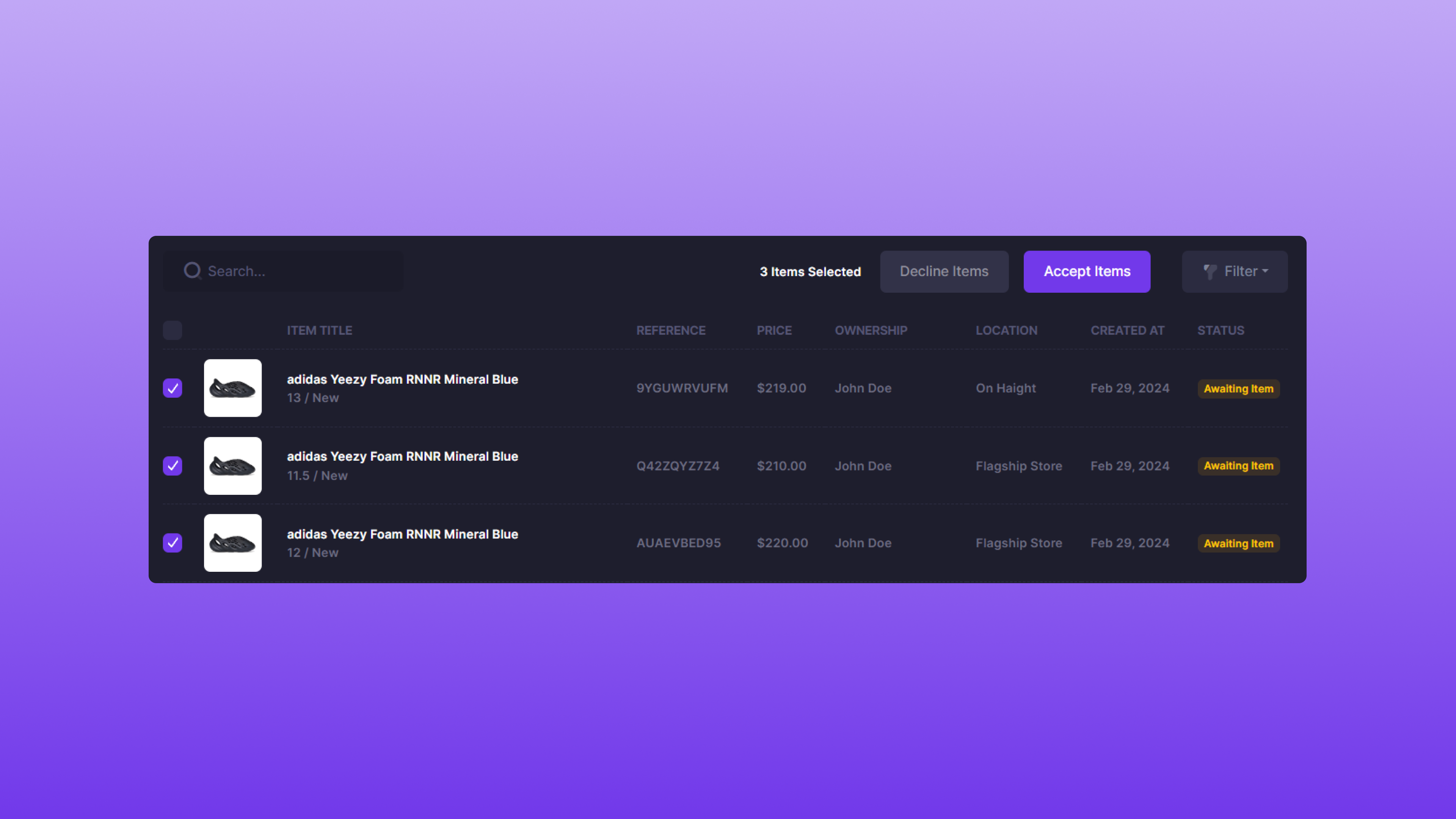 To accept an Item, select the checkbox that references the Item. Once the correct Item is selected, locate the **Accept Items** button and click it.
### After Acceptance
Once the Item has been accepted, the [Item Label](/platform/labels/item-labels) will be available on the Labels page. The Consigner will also receive an email upon acceptance of their Item.
## Declining an Item
To accept an Item, select the checkbox that references the Item. Once the correct Item is selected, locate the **Accept Items** button and click it.
### After Acceptance
Once the Item has been accepted, the [Item Label](/platform/labels/item-labels) will be available on the Labels page. The Consigner will also receive an email upon acceptance of their Item.
## Declining an Item
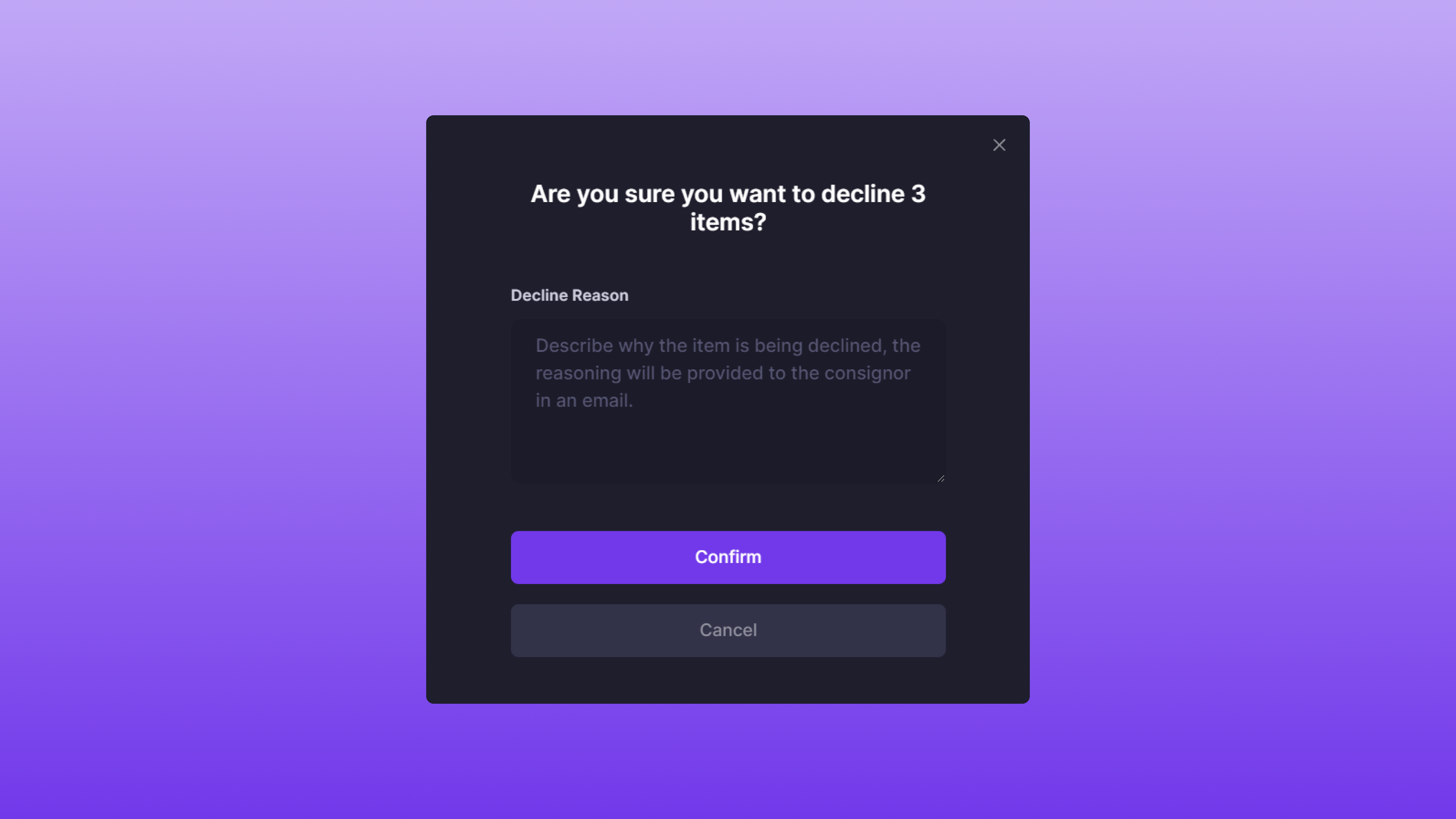 To decline an Item, simply select the checkbox that references the Item. Once the correct Item is selected, locate the **Decline Items** button and click it. Within the modal, there is a **Decline Reason** form field.
The **Decline Reason** will be sent in an email to the Consigner. A few reasons to decline an Item could be:
* Incorrect size or SKU
* Failed authentication
Within the **Decline Reason**, directions can also be provided. For example, if a Consigner accidentally submitted the wrong size, suggesting resubmission with the correct size could streamline the decline flow.
Once an Item is declined, the status will change to **Withdrawal Requested**.
To decline an Item, simply select the checkbox that references the Item. Once the correct Item is selected, locate the **Decline Items** button and click it. Within the modal, there is a **Decline Reason** form field.
The **Decline Reason** will be sent in an email to the Consigner. A few reasons to decline an Item could be:
* Incorrect size or SKU
* Failed authentication
Within the **Decline Reason**, directions can also be provided. For example, if a Consigner accidentally submitted the wrong size, suggesting resubmission with the correct size could streamline the decline flow.
Once an Item is declined, the status will change to **Withdrawal Requested**.